Swipe Trigger List Widget is a premium gesture-driven list component for FlutterFlow/Flutter that triggers an action when the user swipes an item past a defined threshold — without needing visible action buttons ✅👆. It’s perfect for “swipe to archive”, “swipe to mark as read”, “swipe to complete”, and other one-gesture workflows where speed and simplicity matter.
Functionality
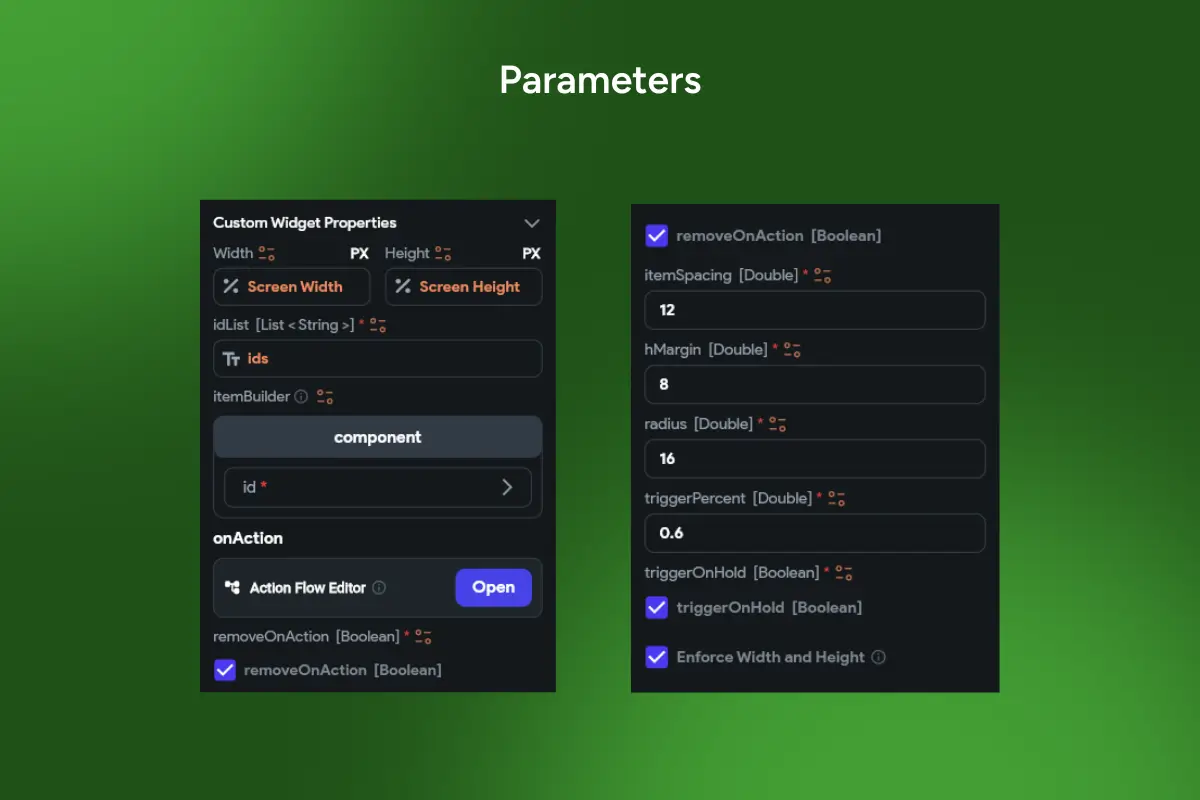
👆 Swipe an item to trigger onAction when it reaches triggerPercent (e.g., 0.6) ⏸️ Optional triggerOnHold to require a short hold before the action fires (prevents accidental swipes) 🧹 Optional removeOnAction to auto-remove the item from the list after the action completes 🆔 Stable data handling via idList (List<String>) + custom itemBuilder for any row UI 📐 Clean layout controls: itemSpacing, hMargin, radius 📱 Tested on real devices and optimized for smooth scrolling and reliable gestures 🧩 Works great with FlutterFlow Action Flow (update backend, show snackbars, undo, navigate, etc.)
Perfect for
💬 Chats & inboxes (swipe to archive / mute / mark read) 📝 Tasks (swipe to complete) 📰 Notifications (swipe to dismiss) 🛒 Saved items / wishlists (swipe to remove) 📁 File lists (swipe to move to trash)
Why it improves UX
It delivers the fastest possible interaction: one swipe, one outcome. No extra buttons, no clutter — just clean, modern mobile UX that users already understand.
🔎 SEO Keywords: swipe trigger list flutterflow, swipe to trigger action widget, swipe to archive list flutter, swipe to mark as read widget, swipe to complete list flutterflow, gesture action list component, triggerPercent swipe threshold, removeOnAction list widget, triggerOnHold swipe action, inbox swipe gesture widget